跳到主要内容

Motion Canvas v3.17.0

· 阅读需 2 分钟

Jacob
Motion Canvas Creator

New features 🎉

  • levirs565's avatarLatex

    节点现在支持补间:

    #800
    Press play to preview the animation
    import ...

    export default makeScene2D(function* (view) {
    const tex = createRef<Latex>();
    view.add(<Latex ref={tex} tex="{{y=}}{{a}}{{x^2}}" fill="white" />);

    yield* waitFor(0.2);
    yield* tex().tex('{{y=}}{{a}}{{x^2}} + {{bx}}', 1);
    yield* waitFor(0.2);
    yield* tex().tex(
    '{{y=}}{{\\left(}}{{a}}{{x^2}} + {{bx}}{{\\over 1}}{{\\right)}}',
    1,
    );
    yield* waitFor(0.2);
    yield* tex().tex('{{y=}}{{a}}{{x^2}}', 1);
    });

  • squigglesdev's avatar

    ?render?present url 参数可用于在打开编辑器时立即开始渲染或演示。

    #631

Fixed bugs 🐛

  • aarthificial's avatarTxt

    节点正确支持补间表情符号。

    #1085
  • aarthificial's avatar

    修复恢复

    Code

    节点引起的堆栈溢出

    #1084
  • aarthificial's avatar

    防止无效的缓存大小。

    #1083
  • aarthificial's avatar

    修复线补间。

    #1075
  • aarthificial's avatar

    修复文本对齐。

    #1061

查看 更新指南 获取如何更新现有项目的信息。

Motion Canvas v3.16.0

· 阅读需 2 分钟
Jacob
Motion Canvas Creator

New features 🎉

  • ksassnowski's avatar

    全新的

    Camera

    节点,带有用于缩放和聚焦元素的辅助方法:

    #1019
    Press play to preview the animation
    import ...

    export default makeScene2D(function* (view) {
    const camera = createRef<Camera>();
    const rect = createRef<Rect>();
    const circle = createRef<Circle>();

    const scene = (
    <Node>
    <Grid stroke={'#fff1'} lineWidth={1} size="100%" spacing={25}>
    <Rect ref={rect} fill={'#e6a700'} size={50} position={[50, -25]} />
    <Circle ref={circle} fill={'#e13238'} size={50} position={[-50, 25]} />
    </Grid>
    </Node>
    );

    view.add(
    <>
    <Camera.Stage
    scene={scene}
    x={-200}
    width={300}
    height={200}
    stroke={'#242424'}
    lineWidth={4}
    />
    <Camera.Stage
    cameraRef={camera}
    scene={scene}
    x={200}
    width={300}
    height={200}
    stroke={'#242424'}
    lineWidth={4}
    />
    </>,
    );

    yield* all(
    camera().centerOn(rect(), 3),
    camera().rotation(180, 3),
    camera().zoom(1.8, 3),
    );
    yield* camera().centerOn(circle(), 2);
    yield* camera().reset(1);
    });

  • aarthificial's avatar

    新的 effects 可以用于对信号中的变化做出反应:

    #1043
    import {makeScene2D} from '@wangyaoshen/locus-2d';
    import {createEffect, createSignal} from '@wangyaoshen/locus-core';

    export default makeScene2D(function* () {
    const signal = createSignal(0);

    createEffect(() => {
    console.log('Signal changed: ', signal());
    });

    yield* signal(1, 2);
    });
  • mancopp's avatar

    所有向量操作现在都可以与向量信号一起使用,以获得更简洁的代码:

    #1030
    // Before
    yield* node().position(node().position().add([200, 100]), 2);

    // Now
    yield* node().position.add([200, 100], 2);
  • aarthificial's avatarPolygon.vertex()

    Polygon.vertexCompletion()

    可用于检索有关多边形顶点的信息。

    #1045
  • mancopp's avatar

    Code 节点的新示例。

    #1023

Fixed bugs 🐛

  • aarthificial's avatar

    处理时间事件的无效值。

    #1044
  • aarthificial's avatar

    修复着色器中的目标 uv。

    #1026
  • Josephine19001's avatar

    修复布局 gap 属性的类型。

    #1039
  • aarthificial's avatar

    修复 Code 大小计算。

    #1025

查看 更新指南 获取如何更新现有项目的信息。

Motion Canvas v3.15.0

· 阅读需 4 分钟
Jacob
Motion Canvas Creator

New features 🎉

  • aarthificial's avatar

    全新的

    Code

    节点,具有专用代码信号、可自定义语法高亮和更具表现力的动画系统(包括自动基于差异的转换)。

    #946
    Press play to preview the animation
    import ...

    export default makeScene2D(function* (view) {
    const code = createRef<Code>();

    view.add(
    <Code
    ref={code}
    fontSize={28}
    fontFamily={'JetBrains Mono, monospace'}
    offsetX={-1}
    x={-400}
    code={'const number = 7;'}
    />,
    );

    yield* waitFor(0.6);
    yield* all(
    code().code.replace(code().findFirstRange('number'), 'variable', 0.6),
    code().code.prepend(0.6)`function example() {\n `,
    code().code.append(0.6)`\n}`,
    );

    yield* waitFor(0.6);
    yield* code().selection(code().findFirstRange('variable'), 0.6);

    yield* waitFor(0.6);
    yield* all(
    code().code('const number = 7;', 0.6),
    code().selection(DEFAULT, 0.6),
    );
    });

  • aarthificial's avatar

    新的

    withDefaults

    辅助函数让你可以快速使用自己的默认值扩展节点。

    #982
    import {Txt, withDefaults} from '@wangyaoshen/locus-2d';

    export const MyTxt = withDefaults(Txt, {
    fill: 'rgba(255, 255, 255, 0.6)',
    fontFamily: 'JetBrains Mono',
    fontSize: 28,
    });
  • aarthificial's avatar

    使用

    loop

    时,可以省略迭代计数以创建无限循环:

    #952
    // These two are equivalent:
    yield* loop(() => { /* animation */ });
    yield* loop(Infinity, () => { /* animation */ });
  • aarthificial's avatar

    新的

    spawn

    函数让你可以在任何地方在后台运行动画,而无需 yield 它们。

    #951
  • aarthificial's avatarPolygon

    现在扩展

    Curve

    ,使其可以访问所有与曲线相关的属性,如

    startArrow

    radius

    #961
  • jmaen's avatar

    编辑器中的颜色字段现在带有视觉颜色选择器。

    #962
  • aarthificial's avatar

    新的

    Vector2

    方法: #985

  • aarthificial's avatar

    新的

    cardinalPoint

    方法让你可以将

    Origin

    s 和

    Direction

    s 映射到节点的相应 cardinal 点。

    #988
  • aarthificial's avatar

    新的

    waitTransition

    让你使用节点为转场设置动画。

    #983
  • aarthificial's avatar

    传递给 OpenGL 时,

    Matrix2D

    现在转换为 3x3 方阵(而不是 3x2 矩阵)

    #984
  • aarthificial's avatar

    视图的

    cachePadding

    在计算单个节点的缓存大小时现在被尊重。

    #986
  • Niikelion's avatar

    演示模式现在支持 PowerPoint 快捷方式(Page Up、Page Down 等)

    #993
  • nvborisenko's avatar

    motion-canvas-player shadow root 的部分现在使用 part 公开,可以使用 CSS 自定义。

    #956
  • aarthificial's avatar

    此网站上的 Fiddles 现在在滚动到视图时自动播放。

    #1001

Fixed bugs 🐛

  • CactusPuppy's avatar

    在缓存中考虑斜体字体。

    #968
  • rogerpinho's avatar

    修复快速入门指南中的拼写错误。

    #974
  • aarthificial's avatar

    检索节点的绝对位置时正确处理 offset

    #987
  • aarthificial's avatar

    修复响应式点的样条警告。

    #981

查看 更新指南 获取如何更新现有项目的信息。

Motion Canvas v3.14.0

· 阅读需 1 分钟
Jacob
Motion Canvas Creator

New features 🎉

  • aarthificial's avatar

    着色器 让你使用 WebGL 创建自定义视觉效果。

    #929#920
    Press play to preview the animation
    import ...

    // Original shader created by ufffd
    // https://www.shadertoy.com/view/lcfXD8
    const Shader = `\
    #version 300 es
    precision highp float;

    in vec2 screenUV;
    out vec4 outColor;

    uniform float time;
    uniform vec2 resolution;

    #define g(p) dot(sin(p),cos(p.zxy)) //

    float m(vec3 p){
    return (1.0 + 0.2 * sin(p.y * 6e2))
    * g(0.8 * g(8.0 * p) + 10.0 * p)
    * (1.0 + sin(time + length(p.xy) / 0.1))
    + 0.3 * sin(time * 0.15 + p.z * 5.0 + p.y)
    * (2.0 + g((sin(time * 0.2 + p.z * 3.0) * 350.0 + 250.0) * p));
    }

    void main() {
    vec3 r = normalize(vec3((screenUV - 0.5) * resolution, resolution.y));
    vec3 p;
    vec3 f;
    float e = 50.0;
    float d;
    float i;

    for (p.z = time / 4.0; i++ < 90.0 && e > 0.05; e = m(p += r * d)) {
    d += 0.02 * e;
    }

    f.x = 0.06 + 0.06 * sin(p.z);
    outColor = vec4(2.0 * m(p) - m(p - f) - m(p - f.yxy))
    * smoothstep(0.75, 1.05, 1.0 / d);
    }
    `;

    export default makeScene2D(function* (view) {
    view.add(<Rect shaders={Shader} size={view.size} />);

    yield* waitFor(10);
    });

  • aarthificial's avatar

    节点检查器可以打开和关闭。

    #921
  • jmaen's avatar

    数字输入可以通过左右拖动来编辑。

    #917

查看 更新指南 获取如何更新现有项目的信息。

Motion Canvas v3.13.0

· 阅读需 1 分钟
Jacob
Motion Canvas Creator

New features 🎉

  • aarthificial's avatar

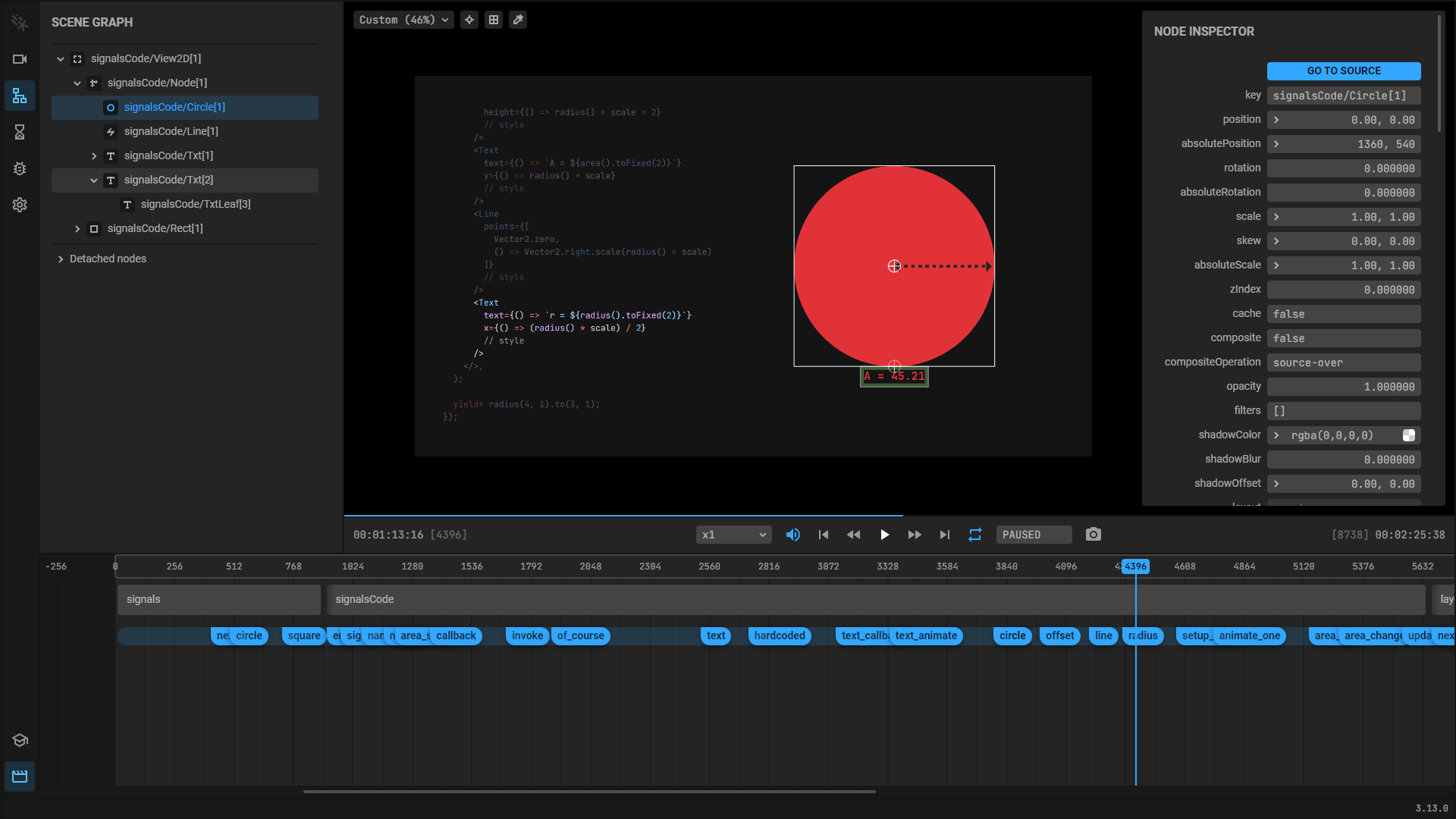
    新的场景图选项卡让你可以查看场景的内容。

    #909#914场景图选项卡
  • jmaen's avatar

    按住 Shift + Ctrl 让你可以拖动时间轴来选择范围。BN 可用于将范围的开头和结尾对齐到播放头。

    #907
  • aarthificial's avatar

    编辑器插件现在可以注册在编辑器右侧显示信息的自定义检查器。

    #913

Fixed bugs 🐛

  • aarthificial's avatar

    拖动时间事件时正确跟踪鼠标。

    #912

查看 更新指南 获取如何更新现有项目的信息。

Motion Canvas v3.12.0

· 阅读需 4 分钟
Jacob
Motion Canvas Creator

New features 🎉

  • aarthificial's avatarLine

    的点现在可以补间。

    #853
    Press play to preview the animation
    import ...

    export default makeScene2D(function* (view) {
    const line = createRef<Line>();
    view.add(
    <Line
    ref={line}
    points={[
    [-150, 70],
    [150, 70],
    [0, -70],
    ]}
    stroke={'lightseagreen'}
    lineWidth={8}
    radius={20}
    closed
    />,
    );

    yield* line()
    .points(
    [
    [-150, 0],
    [0, 100],
    [150, 0],
    [150, -70],
    [-150, -70],
    ],
    2,
    )
    .back(2);
    });

  • aarthificial's avatarTxt

    节点现在可以相互嵌套。

    #861
    Press play to preview the animation
    import {Txt, makeScene2D} from '@wangyaoshen/locus-2d';

    export default makeScene2D(function* (view) {
    view.fill('#141414');
    view.add(
    <Txt fill={'white'} fontSize={32} width={720} textWrap>
    Whereas recognition of the inherent dignity and of the{' '}
    <Txt.i>equal</Txt.i> and inalienable rights of all members of
    the human family is the foundation of <Txt.b>freedom</Txt.b>,
    justice and <Txt fill="#25C281">peace</Txt> in the world.
    </Txt>,
    );
    });
  • aarthificial's avatar

    新的 查询辅助工具 让你可以在场景中查找节点。

    #852
  • rmhartog's avatar

    转场现在可以控制哪个场景

    绘制在顶部

    #832
  • rmhartog's avatar

    新的

    Video.playbackRate

    属性让你可以控制视频的速度。

    #831
  • aarthificial's avatar

    此版本引入了实验性功能的概念。用

    标记,这些功能主要用于测试和收集反馈。在 这个专门的部分 中了解更多。

    #876
  • aarthificial's avatar

    新的 编辑器插件 允许你扩展编辑器的界面。使用它们,你可以在侧边栏中定义自定义选项卡,并在动画预览或演示器之上绘制覆盖层。

    #884
  • aarthificial's avatar

    时间轴现在可以通过按住 LMB 并左右拖动来擦洗。

    #862

    对于复杂的动画,向左拖动可能会有点滞后,因为每次都必须重新运行整个生成器。

  • jmaen's avatar

    悬停在音频图标上现在会显示一个音量滑块,让你可以调整音量。

    #872
  • Vija02's avatar

    ArrowUpArrowDown 键让你可以控制音量。

    #856
  • aarthificial's avatar

    动画范围默认情况下不再可编辑。就像音轨一样,在拖动之前按住 SHIFT 进行编辑。

    #862
  • Vaibhavi-Sita's avatar

    禁用循环时,编辑器将寻找到动画的开头并在那里停止,而不是在结束时暂停。

    #823
  • CactusPuppy's avatarVector2

    现在包括表示每种原点类型的静态属性。

    #855
  • aarthificial's avatarapplyState

    现在可以用于补间到新状态,而不仅仅是立即应用它。

    #859
  • aarthificial's avatar

    Spawner 已被弃用,取而代之的是 children 属性。

    #858
    view.add(
    // before
    <Node spawner={() => range(count()).map(() => <Node />)} />,
    );

    view.add(
    // after
    <Node>{() => range(count()).map(() => <Node />)}</Node>,
    );
  • rmhartog's avatar

    项目配置现在支持 glob 模式

    #834
    import motionCanvas from '@wangyaoshen/locus-vite-plugin';
    import {defineConfig} from 'vite';

    export default defineConfig({
    plugins: [
    motionCanvas({
    project: './src/projects/*.ts',
    }),
    ],
    });
  • rmhartog's avatar

    不透明度在 01 之间限制。

    #835
  • aarthificial's avatar

    加载图片时发生的错误现在在编辑器中正确报告。

    #847

Fixed bugs 🐛

  • aarthificial's avatar

    LayoutProps 接口添加了缺失的 middle 属性。

    #891
  • aarthificial's avatar

    Cardinal 点现在正确考虑节点的偏移。

    #883
  • aarthificial's avatar

    "转到源"操作应该再次工作。

    #895
  • shaikan's avatar

    文件名中的特殊字符现在正确处理。

    #821
  • SleeklyCoding's avatar

    打开输出目录时,如果它不存在将自动创建。

    #787
  • aarthificial's avatar

    修复特定条件下的线抖动。

    #863
  • rmhartog's avatar

    正确计算 Txt 节点的边界框。

    #836
  • aarthificial's avatar

    修复补间 cardinal 点。

    #829

查看 更新指南 获取如何更新现有项目的信息。

Motion Canvas v3.11.0

· 阅读需 2 分钟
Jacob
Motion Canvas Creator

New features 🎉

  • aarthificial's avatar

    节点现在可以倾斜:

    #803
    Press play to preview the animation
    import ...

    export default makeScene2D(function* (view) {
    const ref = createRef<Img>();
    yield view.add(
    <Img
    ref={ref}
    skew={[-24, -12]}
    src="https://images.unsplash.com/photo-1696931073577-5638a6891e1e"
    width={240}
    radius={20}
    />,
    );

    yield* ref().skew([24, 12], 1, easeOutElastic).back(1);
    });

  • levirs565's avatar

    新的

    SVG

    节点让你可以显示和补间 SVG 图形。

    #763

    (支持的 SVG 功能数量仍然有限,该节点主要用于在将来的更新中支持 LaTeX 补间)

  • SleeklyCoding's avatar

    新的 lineCount 属性让你可以检索代码块中的行数。

    #802
  • aarthificial's avatarslideTransition

    现在允许使用

    Origin

    定义的对角线移动。

    #801
  • aarthificial's avatar

    对音频文件所做的任何外部更改现在都会被拾取并自动反映在编辑器中。

    #793
  • aarthificial's avatar

    渲染时,右下角显示估计的剩余时间。

    #795
  • me-nkr's avatar

    新的播放控件用于寻找到动画的非常开始和结束。

    #814
  • alsongarbuja's avatar

    拖动时间事件时,会显示线指示器以帮助将事件与音频精确对齐。

    #808
  • aarthificial's avatar

    按住 MMB 允许你左右拖动时间轴。

    #794
  • aarthificial's avatar

    新的错误警告缺少图片源。

    #817

Fixed bugs 🐛

  • aarthificial's avatar

    特定的事件名称,例如 constructor 不再导致编辑器崩溃。

    #819
  • aarthificial's avatar

    Circle 添加了缺失的 Curve 属性。

    #805
  • aarthificial's avatar

    箭头现在总是指向正确的方向。

    #792

查看 更新指南 获取如何更新现有项目的信息。

Motion Canvas v3.10.0

· 阅读需 3 分钟
Jacob
Motion Canvas Creator

New features 🎉

  • aarthificial's avatarRect

    Circle

    节点现在扩展

    Curve

    ,使它们可以访问其所有属性和方法:

    #771#759
    Press play to preview the animation
    import ...

    export default makeScene2D(function* (view) {
    const ref = createRef<Circle>();
    view.add(
    <Circle
    ref={ref}
    size={160}
    stroke={'lightseagreen'}
    lineWidth={8}
    endAngle={270}
    endArrow
    />,
    );

    yield* all(ref().start(1, 1), ref().rotation(180, 1, easeInCubic));
    ref().start(0).end(0);
    yield* all(ref().end(1, 1), ref().rotation(360, 1, easeOutCubic));
    });

  • levirs565's avatar

    新的 SVG

    Path

    组件:

    #700
    Press play to preview the animation
    import ...

    export default makeScene2D(function* (view) {
    view.add(
    <Path
    scale={8}
    position={-96}
    fill={'lightseagreen'}
    data={
    'M4 6.47L5.76 10H20v8H4V6.47M22 4h-4l2 4h-3l-2-4h-2l2 4h-3l-2-4H8l2 4H7L5 4H4c-1.1 0-1.99.9-1.99 2L2 18c0 1.1.9 2 2 2h16c1.1 0 2-.9 2-2V4z'
    }
    />,
    );
    });

  • ksassnowski's avatar

    用于动画

    Grid

    节点的新

    start

    end

    信号。

    #761
  • aarthificial's avatar

    用于管理引用的新辅助方法: #775

  • aarthificial's avatar

    带有半径的

    Img

    Video

    节点会自动裁剪。

    #773
  • ksassnowski's avatarBBox

    转换方法接受

    PossibleMatrix2D

    #770
  • aarthificial's avatar

    新的

    middle

    cardinal 点

    #758
  • ksassnowski's avatarVector2

    的新

    rotate

    polarLerp

    方法。

    #756
  • Logon27's avatar

    编辑器现在让你可以按 P 复制鼠标坐标

    #737
  • aarthificial's avatar

    可以在不使用持续时间的情况下调用

    restore()

    以立即恢复状态。

    #736

Fixed bugs 🐛

  • aarthificial's avatar

    修复文档页面上的"最后更新者"信息。

    #776
  • Caesarovich's avatar

    时间轴正确显示小时间范围。

    #739
  • aarthificial's avatar

    现在无法生成多个颜色选择器。

    #747

查看 更新指南 获取如何更新现有项目的信息。

Motion Canvas v3.9.0

· 阅读需 2 分钟
Jacob
Motion Canvas Creator

New features 🎉

  • aarthificial's avatar

    所有实体现在从每个包的主入口点导入。唯一的例外是 CodeBlock 节点,它仍然需要完整的导入路径:

    import {all, createRef} from '@motion-canvas/core';
    import {makeScene2D, Circle} from '@motion-canvas/2d';
    // 唯一的例外:
    import {CodeBlock, insert} from '@motion-canvas/2d/lib/components/CodeBlock';

    从子目录导入将继续工作,直到版本 4。

    #721#710
  • aarthificial's avatar

    新的

    presenter

    renderer

    插件 hooks。


    你可以在新的 创作插件 指南中了解如何创建自己的插件。

    #723
  • ajs1998's avatar

    新的

    Random.gauss()

    方法让你可以使用高斯(正态)分布生成随机数。

    #709
  • aarthificial's avatar

    更新的侧边栏设计让你可以通过拖动隐藏时间轴和折叠面板。

    #692
  • aarthificial's avatar

    应用程序范围的设置让你可以配置项目默认值和更改编辑器外观。你可以在左侧的设置选项卡中编辑它们。

    #697
  • aarthificial's avatar

    你可以使用新的吸管工具从画布上选择颜色


    (查看

    浏览器兼容性

    )

    #691
  • aarthificial's avatar

    错误堆栈跟踪现在包括函数名。

    #693
  • aarthificial's avatar

    对 Fiddle 编辑器的整体改进。

    #706#712#713

Fixed bugs 🐛

  • aarthificial's avatar

    修复 package.json 入口。

    #720
  • aarthificial's avatar

    修复可折叠部分。

    #698
  • rtkid-nt's avatar

    渲染/演示时使用项目变量。

    #690

查看 更新指南 获取如何更新现有项目的信息。

Motion Canvas v3.8.0

· 阅读需 2 分钟
Jacob
Motion Canvas Creator

New features 🎉

  • aarthificial's avatar

    全新的 视频 (FFmpeg) 导出器让你可以直接将动画渲染到视频文件。它默认包含在所有使用 npm init @motion-canvas 创建的新项目中(可选择退出)。查看文档了解 如何在现有项目中安装

    #673#660
  • aarthificial's avatar

    改进的渲染按钮提供关于渲染过程的视觉反馈。

    #662#681
  • aarthificial's avatar

    新的 OUTPUT DIRECTORY 按钮让你可以在文件资源管理器中显示当前输出目录。你可以直接在 RENDER 按钮下方找到它。

    #663
  • aarthificial's avatar

    可折叠面板现在有动画。

    #671
  • aarthificial's avatar

    数组值,例如线的点,现在显示在检查器中。

    #670
  • aarthificial's avatar

    create 包现在支持命令行参数,用于提供答案而无需通过交互式提示:

    #668
    npm init @motion-canvas@latest -- --name Hello --path ./hello --language ts
  • aarthificial's avatar

    Meta 字段可以声明描述。当在编辑器中悬停在字段上时,描述将以工具提示的形式显示。

    #664
  • aarthificial's avatar

    新的 hooks 让插件可以扩展播放器的行为(插件文档即将推出)。

    #679

Fixed bugs 🐛

  • aarthificial's avatar

    正确支持外部图片的 URL。

    #678
  • aarthificial's avatar

    移除黄色依赖预捆绑警告。

    #676
  • aarthificial's avatar

    修复通过拖动波形编辑音频偏移。

    #674
  • aarthificial's avatar

    忽略禁用布局的子节点。

    #669
  • aarthificial's avatar

    防止 Color tree shaking。

    #666

查看 更新指南 获取如何更新现有项目的信息。